When an order ships in pieces — some items go out today, others land on backorder, the customer cancels half — the order page should tell you exactly what's where. Two recent rounds of QA caught it doing the opposite: counts that didn't match ShipStation, cancelled items still wearing an "Awaiting Shipment" badge, and the same SKU showing up on two shipments at once.
This release fixes all of it.
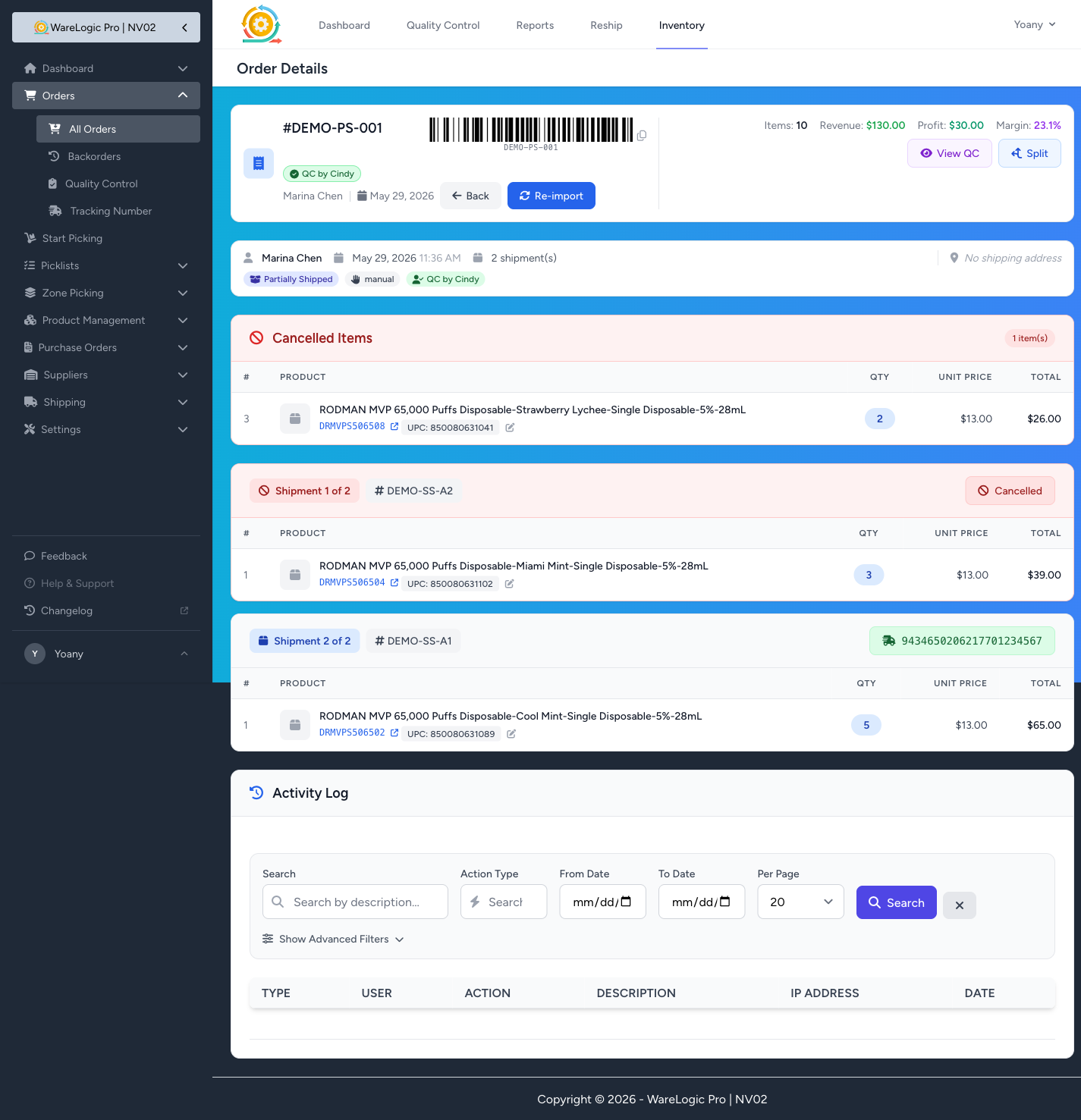
Cancelled and backorder shipments are visually obvious
When the same order ends up with one shipment going out the door and another holding the close-short / cancelled items, the on-screen state now matches reality:
- Cancelled shipments wear a red "Cancelled" badge with a
🚫icon, instead of looking like they're still awaiting shipment or awaiting inventory. The whole block gets a soft red header so it reads as "this one is done, dropped." - The "Unshipped Products" red banner becomes "Cancelled Items" on partially-shipped and cancelled orders — same data, but the label and icon stop screaming "still needs to ship!" for items that were already cancelled.
- Shipments without a tracking number are no longer left in limbo. When an order is closed short, any pending or backorder shipment carrying the cancelled items flips to Cancelled automatically — no manual cleanup, no stale "Awaiting Inventory" tag a week later.
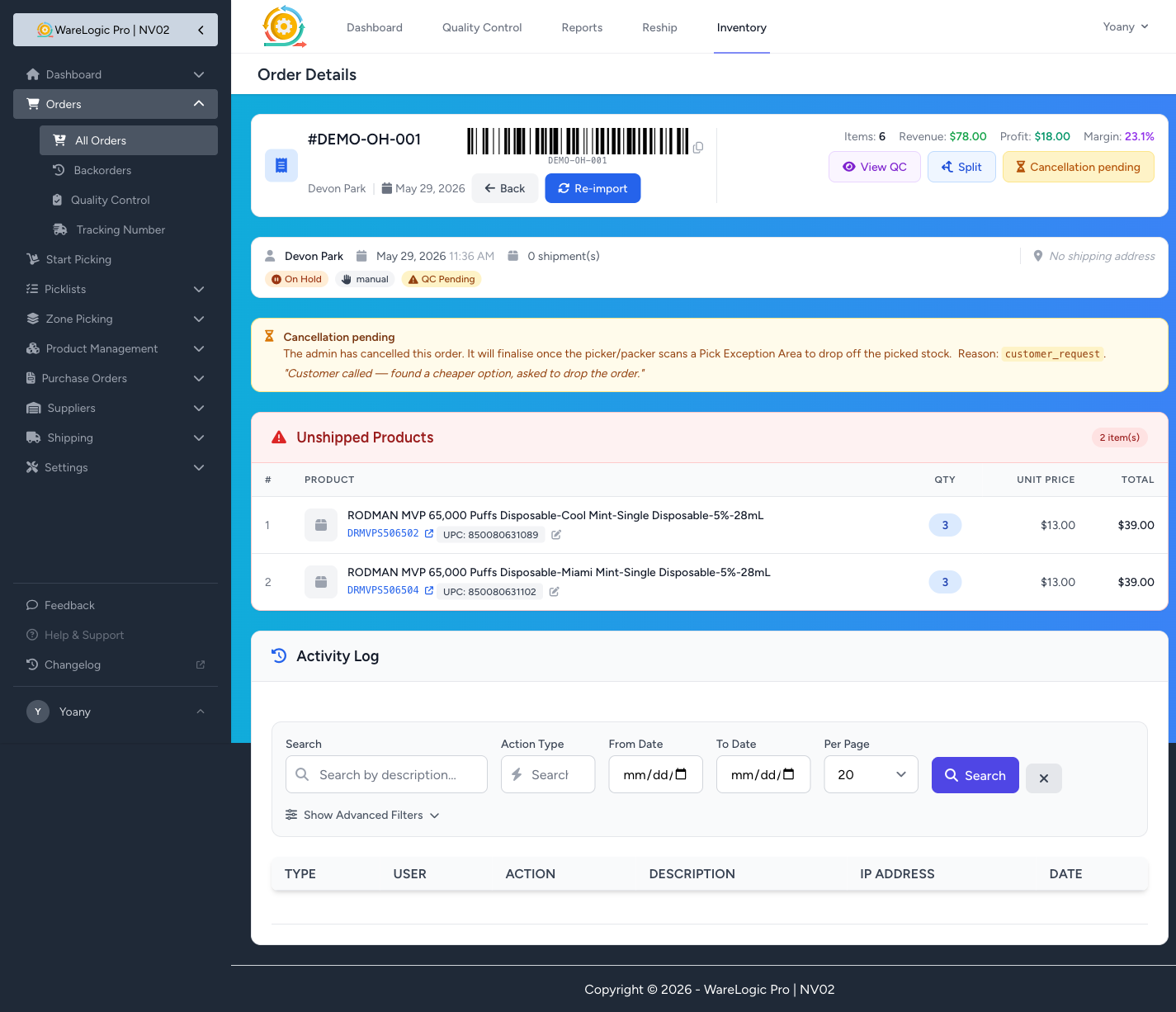
On Hold orders explain themselves
After an admin cancels an order that's mid-pick, the order parks at On Hold until a picker or packer scans a Pick Exception Area. That intermediate state used to look like a normal active order — the red Cancel button still showed up, clicking it did nothing, and the page didn't say why the order was sitting there.
Now:
- The Cancel button is replaced by an amber, disabled "Cancellation pending" button with a tooltip explaining the order is waiting for the operator to drop off picked stock.
- A new amber info banner appears at the top of the order, including the reason code the admin chose ("customer request", "out of stock", etc.) and any free-text notes they added. Anyone glancing at the order knows what's happening and what needs to happen next.
New: Cancel backorder, on its own
When the customer can't wait for the backorder portion of an order but the shipped portion already left, the only option used to be "cancel the whole order, scan PEA, restart." Now each backorder shipment carries its own red Cancel backorder button:
- Same reason picker as the regular cancel — pick why, add notes if you want, confirm.
- Only the backordered portion is cancelled. The rest of the order is untouched, including any items that already shipped or are about to.
- The committed quantity for those items is released so the stock becomes immediately available to new orders.
This is the cleanest path for "ship what we have, drop what we don't" — no full re-cancel, no inventory weirdness.

Shipment quantities now match what ShipStation actually shipped
A subtle but important fix lurking inside this release: when ShipStation splits an order across multiple sub-orders (one shipped + one backorder, with different per-sub-order quantities of the same SKU), the WMS used to copy the original ordered amount onto the shipped shipment instead of the actual shipped quantity. So a line might read "shipped: 3 units" on screen when ShipStation only sent 1.
That's fixed in two ways:
- Going forward, every shipment record built from a ShipStation webhook is anchored to the SS items list — what ShipStation says shipped is what shows on the shipment.
- For existing orders, a one-off command (
inventory:reconcile-backorder-shipments) sweeps the database and corrects any shipment row that's still carrying the stale number. Operations will run this once on staging; from there the data stays self-correcting.
Across the dev dataset this swept 597 shipment rows: 123 had their quantity corrected, 463 had a duplicated SKU removed entirely (the backorder shipment was the only one that should have held it), and 14 were flagged for a manual eyeball where the math didn't add up cleanly.
Why this matters in practice
If you've ever opened a partially-shipped order and had to mentally subtract the backorder column from the shipment column to figure out what actually went to the customer — that step is gone. The numbers on screen are now the numbers ShipStation has. The badges describe what each shipment actually is. And the cancel buttons only appear where they'll do something useful.