When v0.1.15 turned on real-time Shopify inventory webhooks, every event was technically arriving, getting verified, and… being silently skipped. The webhook payload only carries a numeric inventory_item_id (not the SKU), and the lookup table that translates it to SKU was empty on every fresh deployment. So nothing actually adjusted.
This release closes that gap and adds a couple of operator-facing niceties on top.
The catch-up happens on the next sync
The existing VaporDNA Inventory Sync (Shopify) connection that runs every 30 minutes already iterates every Shopify product to keep prices and locations in step. We've extended it to also seed the inventory_item_id ↔ SKU lookup table on every run.
The first time the cron fires after this deploy (or you click Sync Now in Settings → Sync Connections), the entire Shopify catalogue gets mapped in one pass — roughly 12,000 SKUs in a few seconds. From the next webhook onward, every Shopify-side stock change resolves to a real product and adjusts the WMS accordingly.
For the rare cases where a Shopify SKU's ID comes through in the longer GID format (gid://shopify/InventoryItem/44899547054139), we normalise it down to the same numeric ID the webhook payload uses, so both ingest paths land on the same row.
What you'll see on the order side
Every applied delta records two things: a real inventory adjustment row (audit trail) and an activity feed entry on the affected product.
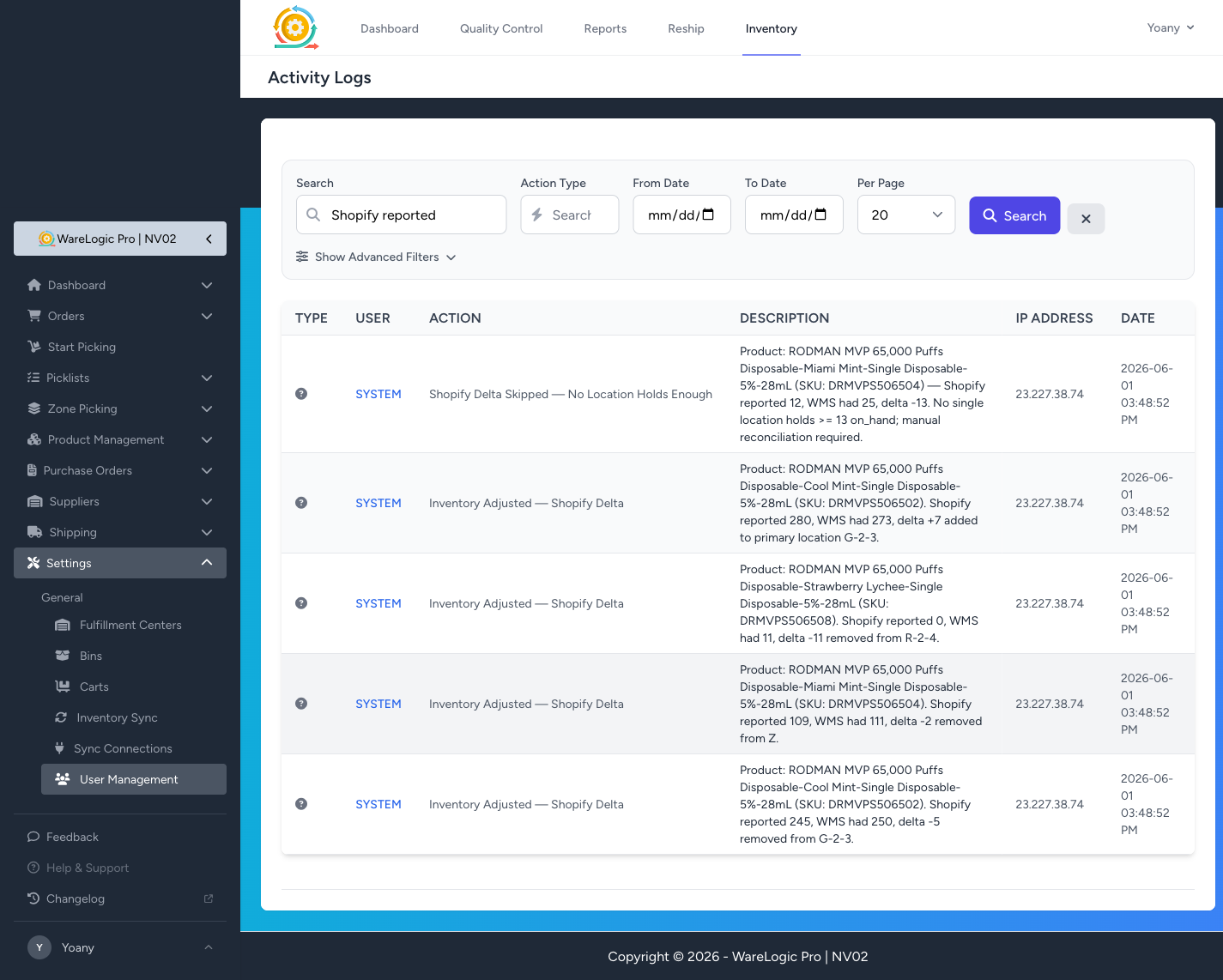
Three outcomes you'll see in the feed:
- Inventory Adjusted — Shopify Delta — the common case. Description spells out the math, e.g. "Shopify reported 245, WMS had 250, delta -5 removed from G-2-3."
- Inventory Adjusted — Shopify Delta with
delta +N— Shopify is ahead of the WMS, so we add the difference to the primary location. - Shopify Delta Skipped — No Location Holds Enough — the safety guard. Shopify wants us to remove more than any single location holds, so instead of pushing a location negative we skip the adjustment and flag it for manual reconciliation. These should be rare and worth eyeballing when they appear.
Search the global activity log for Shopify Delta to pull the audit trail at any time.
A friendlier way to watch the flow
Bundled in this release: Laravel Pail for real-time log tailing. Replaces the brittle tail -f storage/logs/laravel.log | grep … flow with a single artisan command that pretty-prints structured payloads, colours by log level, and filters cleanly.
Some commands that pair well with the new visibility logs:
# Everything Shopify is doing right now
php artisan pail --filter="Shopify inventory_levels"

# Just the deltas that landed (applied_add / applied_remove)
php artisan pail --filter="applied_"

# Just the safety-flag skips (worth eyeballing when they fire)
php artisan pail --filter="Shopify Delta Skipped"

# The n8n puller — when it ran and how many mappings it seeded
php artisan pail --filter="Inventory sync ["

# Or zoomed out, levelled
php artisan pail --level=warning
Works identically on local, staging, and production. No setup beyond composer install after pulling this release.
Heads-up: data-hygiene side effect
When the first wave of Shopify deltas lands you may notice a chunk of adjustments routing to a location called (Unspecified) rather than a real warehouse bin. That's the catch-all the WMS uses for products that don't have a proper warehouse location attached yet — the delta math is correct, it's just landing in the unassigned bucket.
Easiest cleanup: pull a quick report of products whose primary location is (Unspecified), assign them to their real bins in Product Management, and from then on Shopify deltas will route to the right place automatically.