Until now, attaching a product to a bin meant either editing the product, editing the location, or doing a full Move. None of those were quite right when you just want to say "this SKU also lives over there." This release closes that gap.
What It Is
A new Manage Product Locations page under Product Management in the sidebar — opens to a single search bar. Find the SKU you care about by name, SKU, UPC, case UPC, or any pack-bundle UPC, and the page snaps to show you:
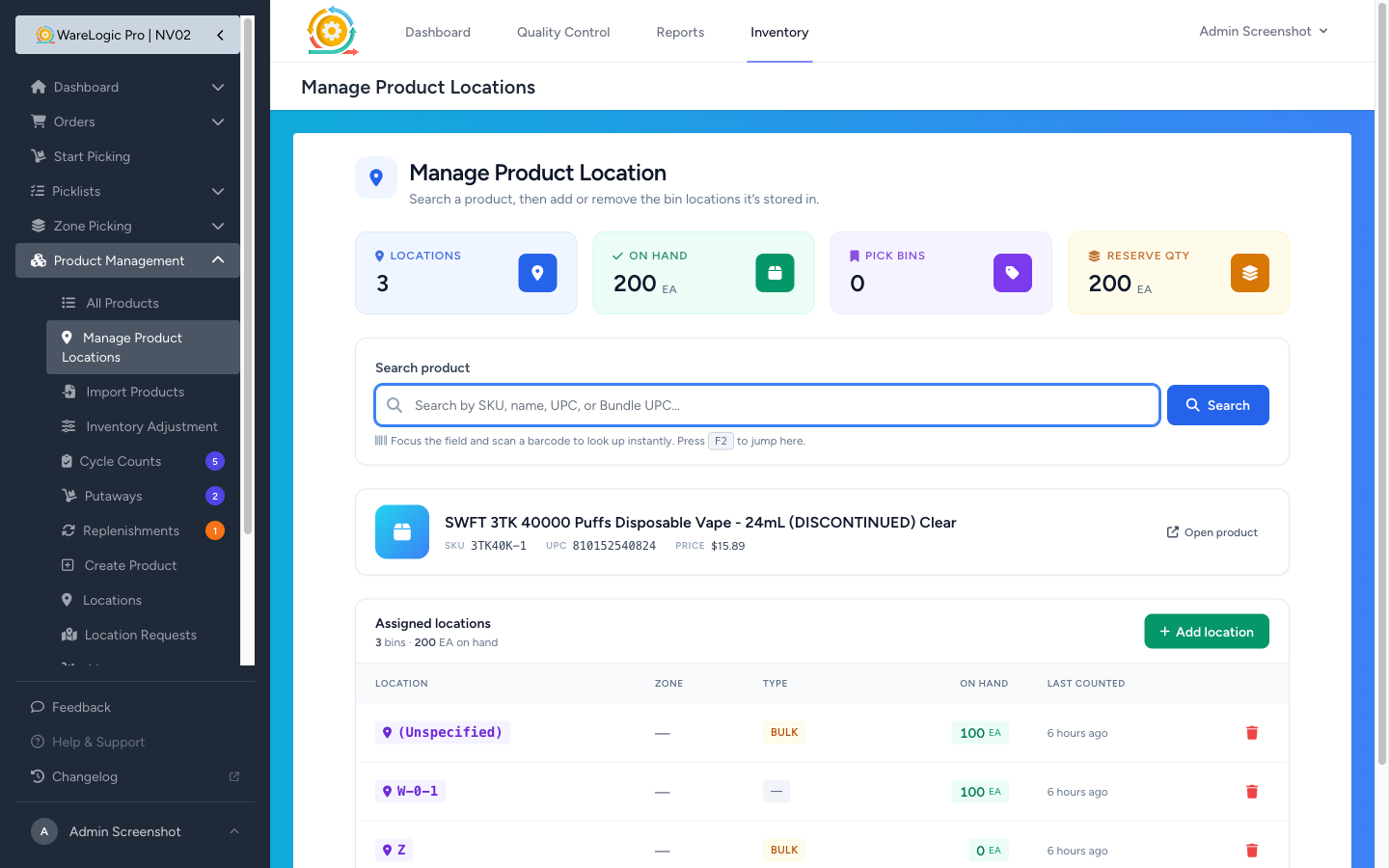
- A 4-tile KPI strip — Locations, On Hand, Pick Bins, Reserve Quantity
- A product summary card with the product's basic details
- An Assigned Locations table with the bins it's in, the on-hand at each, and the bin type (Pick / Bulk / Staging)
- + Add location to attach a bin
- Trash on each row to detach one
Adding a Bin Is a Search-Only Modal
Click + Add location and a modal opens with an empty input. No list. You either scan or start typing the bin code — matching bins appear as you go, and bins already attached to this product are filtered out so you can't double-attach.
Tap the bin you want and it attaches with a success toast. No save buttons, no page reloads. The KPI tiles update on the spot.
Removing a Bin Knows Whether It Has Stock
Tap the trash icon and the confirmation depends on what's there:
- Bin is empty (
on_hand = 0) — standard "Remove?" confirm, single tap to detach - Bin still has stock — confirmation pops with an amber warning and a "Remove anyway" button. If you confirm, the detach also writes an Inventory Adjustment with reason Location Detached (Manual) so the missing stock is properly accounted for in your audit trail
Both attach and detach also write to the product's Activity Log so you can see later who moved what, when, and how much was at the bin when it was removed.
On the PDA It Reshapes for One Hand
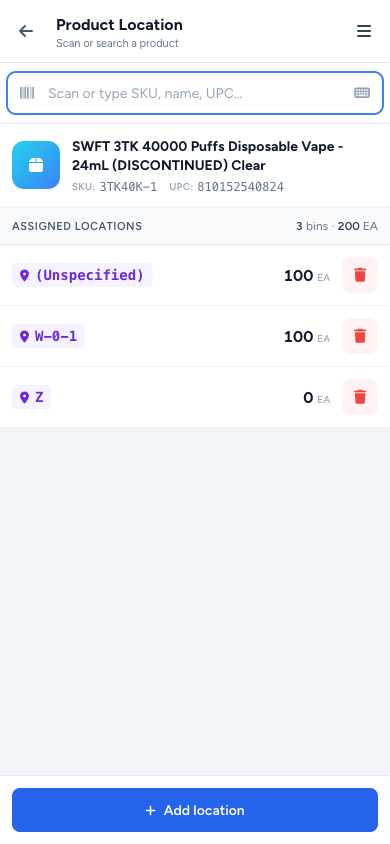
Open the same page on a phone (or shrink your browser narrow enough) and it auto-routes to the PDA twin. The structure is the same, but every element is rebuilt for thumb operation:
- Sticky header with back + title + hamburger
- Scan input with the same
inputmode=none+ keyboard toggle pattern as Cycle Counts — hardware scanners drop barcodes straight in, no soft keyboard popping up - Auto-select on long scans — if your scan hits exactly one product with a 6+ character code, you skip the result list entirely and jump to the product
- Full-width edge-to-edge bin rows with violet bin pill + quantity + red trash
- Sticky + Add location CTA at the thumb-zone bottom, opening a full-screen modal
Override the auto-detection with ?view=desktop if you want the desktop layout on a tablet, same way as Cycle Counts.