This release puts the whole floor on the wall screen, brings locations and product editing to the handheld, and gives store pickup orders a proper home so they never get picked or shipped by mistake. Managing users and roles is redesigned from the ground up, and access to every page is now enforced, not just hidden from the menu.
A Rebuilt Live Insights TV Board
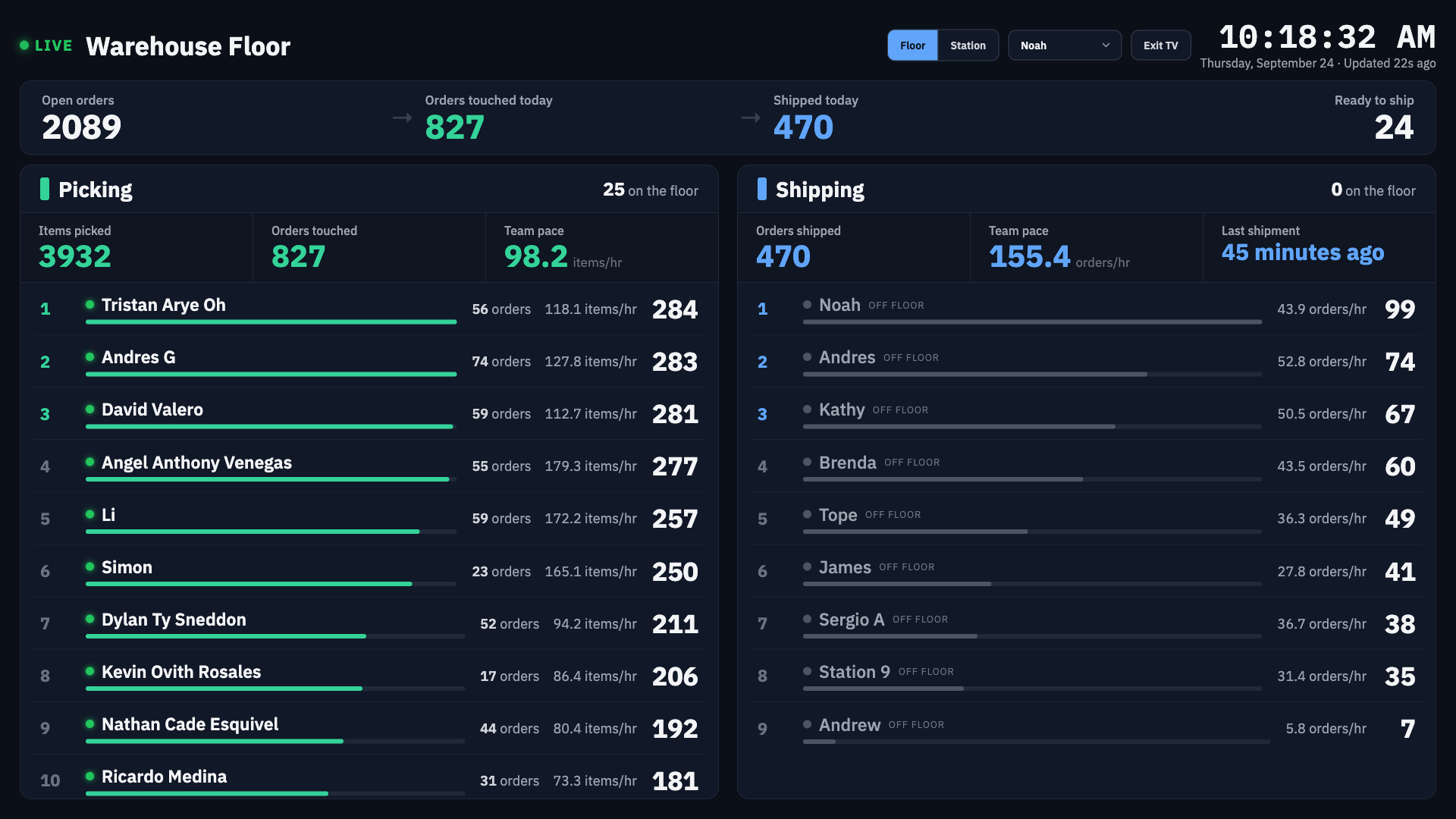
- The TV board now shows both teams side by side: Picking and Shipping, plus a strip showing how orders are flowing from open to picked to shipped.
- A new station mode focuses the screen on one station, with its rank, its gap to the station above and, from third place down, how far it is behind the leader.
- Each picker's row now shows how many orders their items came from, next to the item count. 1,098 items across 17 orders is a very different job from 249 across 58.
- Click any row in the station list to focus on that station. The station picker is now a dark dropdown that matches the board and works with the keyboard.
- The board fills the whole screen, shows who is on the floor right now, and has an Exit TV button.
- Big numbers and stats stay inside their cards on shorter screens such as an iPad Mini.
Rates That Stop Falling When the Work Stops
- A picker's live rate is now measured up to their last pick, so it no longer keeps dropping while they're on a break or done for the day. It now matches the rate shown on the picking reports.
- A shipper who has stopped keeps the pace they actually worked. Before, someone who shipped 50 orders by 11:00 could read 21/hr at the time and 9.5/hr three hours later just from standing still.
Locations on the Handheld
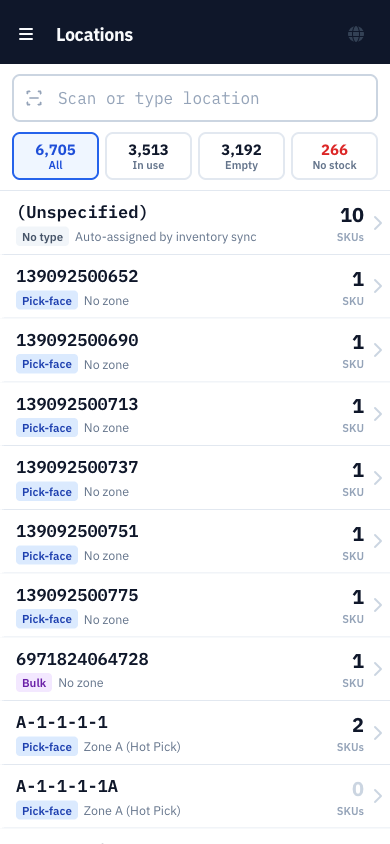
- Opening Locations on a handheld now brings up a scan-first screen instead of the desktop report. Scan a bin label to jump straight to that bin, or filter by how full locations are.
- Each location lists its products with what's on hand there and what's available overall, with a quick search by SKU, UPC or name.
- Tap a product to see its details and adjust Min and Max with large +/- buttons. A warning appears when available stock has gone negative.
- A new Edit Location screen uses large tap buttons for type and warehouse, a Print bin label button, and asks before deleting.
Edit Products on the Handheld
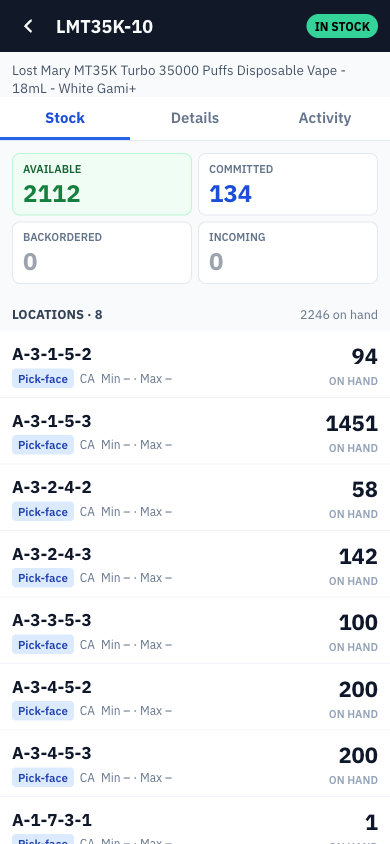
- Editing a product on a handheld now opens a screen built for it, with three tabs: Stock, Details and Activity.
- Stock shows the count tiles and every location holding the product, and lets you add it to a new location. The reorder point and Shopify sync are right there too.
- Details covers name, SKU, weight, UPC, price, cost, pack bundles, bypass-scan and more.
- Activity shows the product's history grouped by day, with quick filters for picks, quantity changes and location changes.
Store Pickup Orders
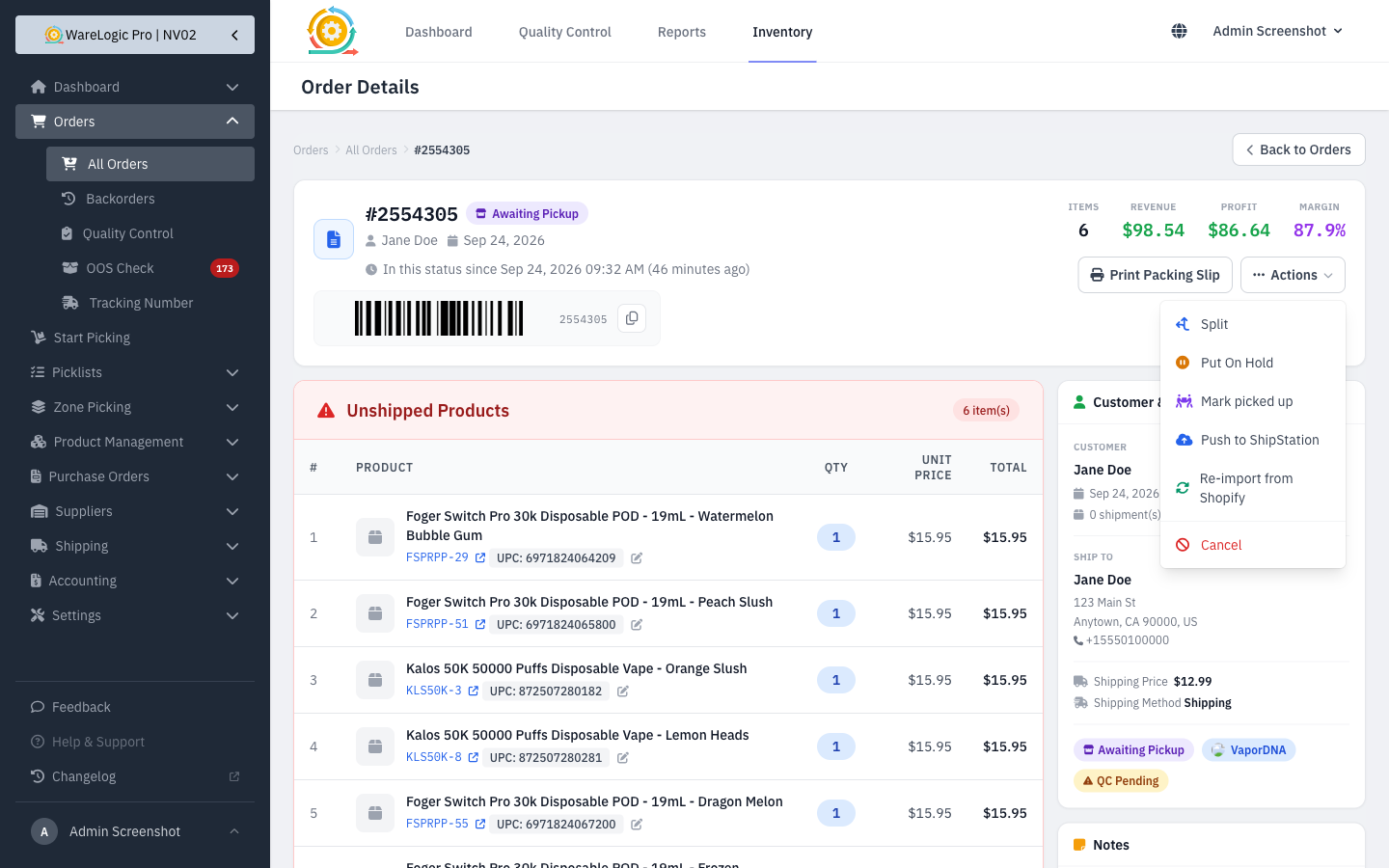
- Shopify orders tagged for pickup now move to a new Awaiting Pickup status. They stay out of every picking flow and batch print, and are never sent to ShipStation.
- When the customer collects the order, Mark picked up closes it in the WMS and settles the stock. The order is then fulfilled in Shopify as usual.
- Shopify order tags that already exist in the WMS now carry over to the order automatically, even when the tag is added a moment after checkout.
Redesigned Users & Roles
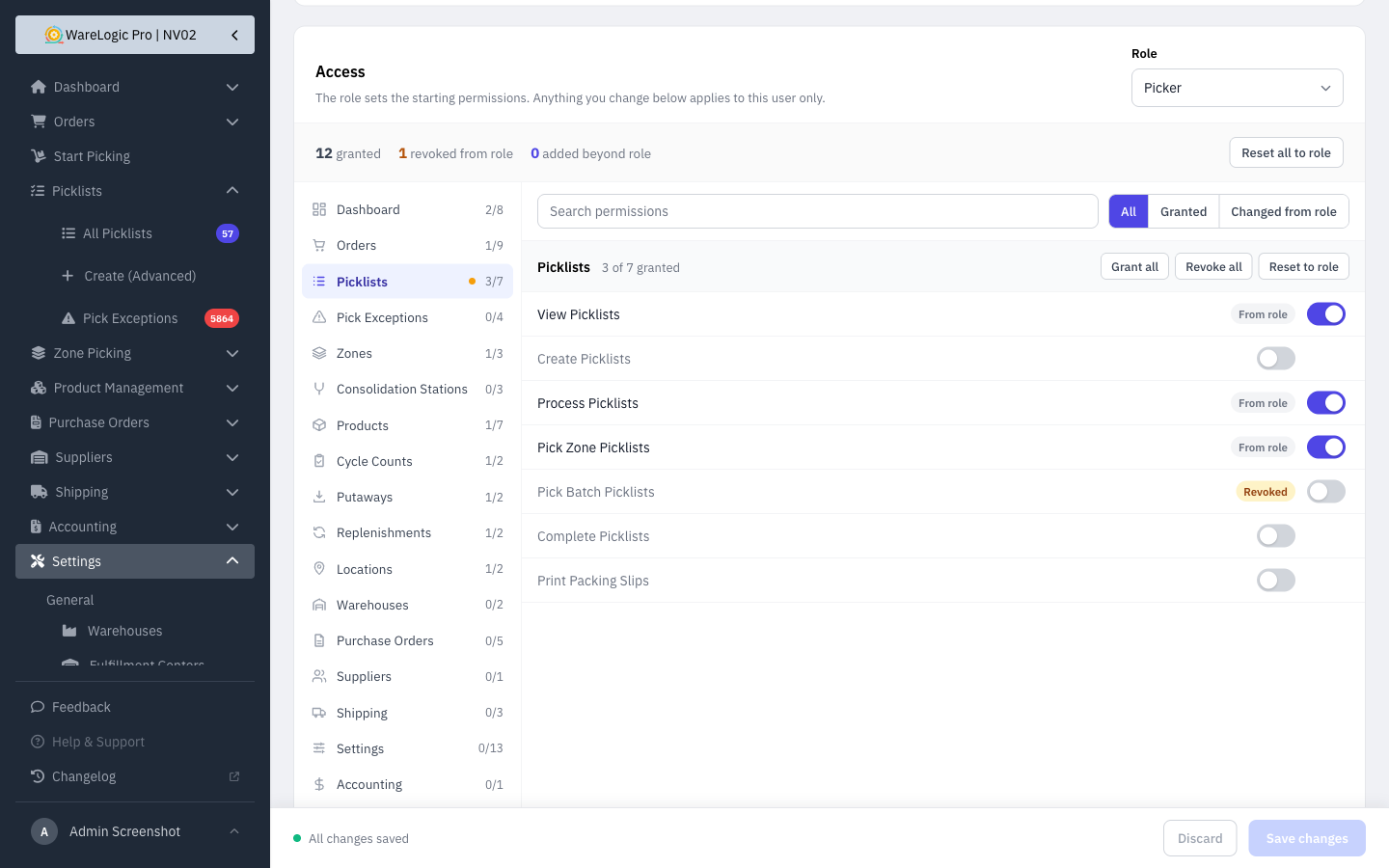
- The Edit User page is redesigned: an Account card for name, email and password, and an Access card where permissions are grouped toggles you can search and filter.
- You can now take away a single permission from one user without changing their role. The permission shows as Revoked on their page, and everyone else in that role keeps it.
- A save bar stays pinned to the bottom of the page and shows when you have unsaved changes.
- Creating, editing and duplicating a role uses the same design. A dropdown in the header jumps straight to another role, and asks first if you have unsaved changes.
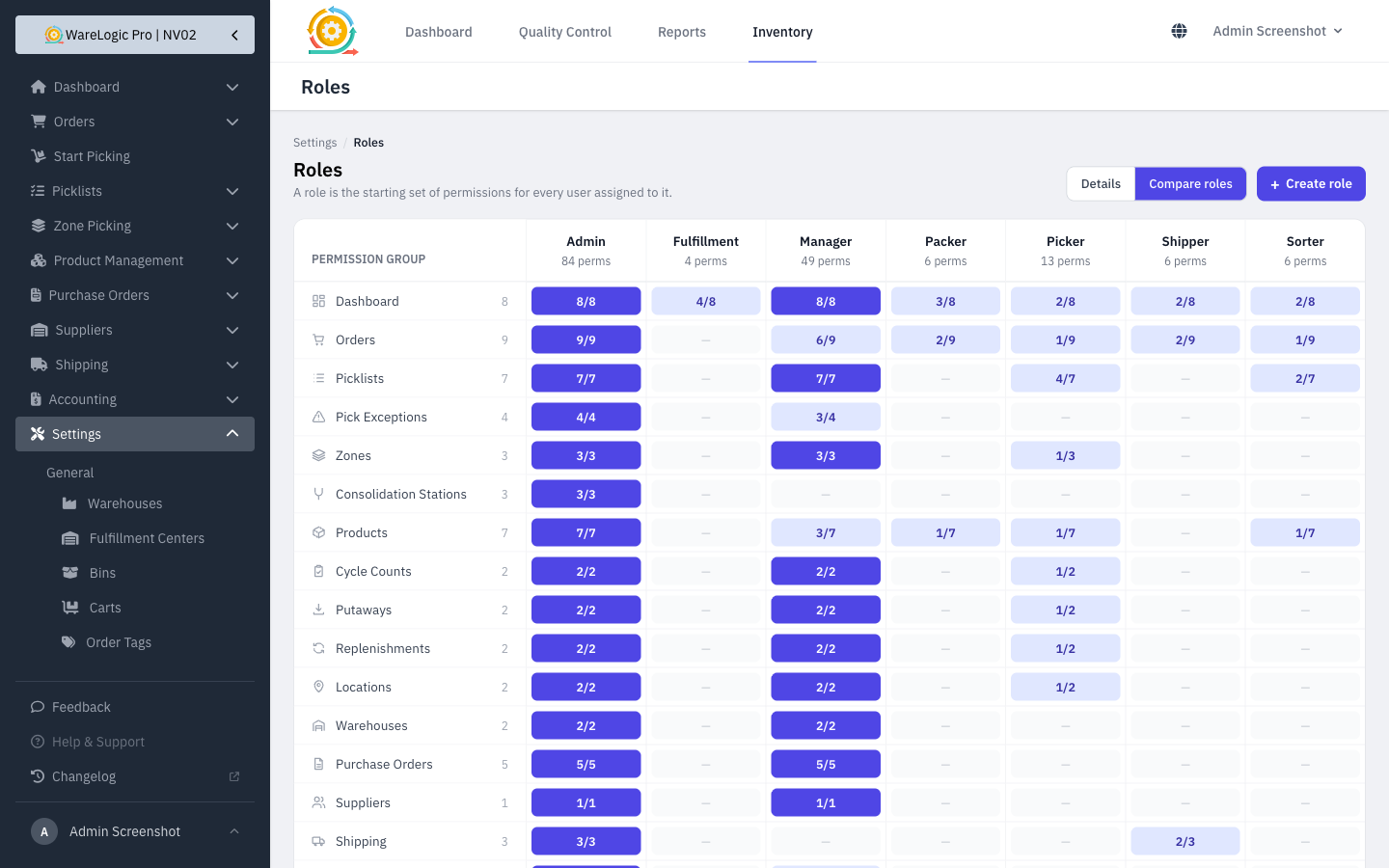
- The Roles page has a Details view showing everything a role can do, and a Compare view that lines up every role side by side.
- Built-in roles, and roles still assigned to users, can no longer be deleted by accident.
- Dropdowns for role and ShipStation account now match the rest of the app.
Payment Holds per Sales Channel
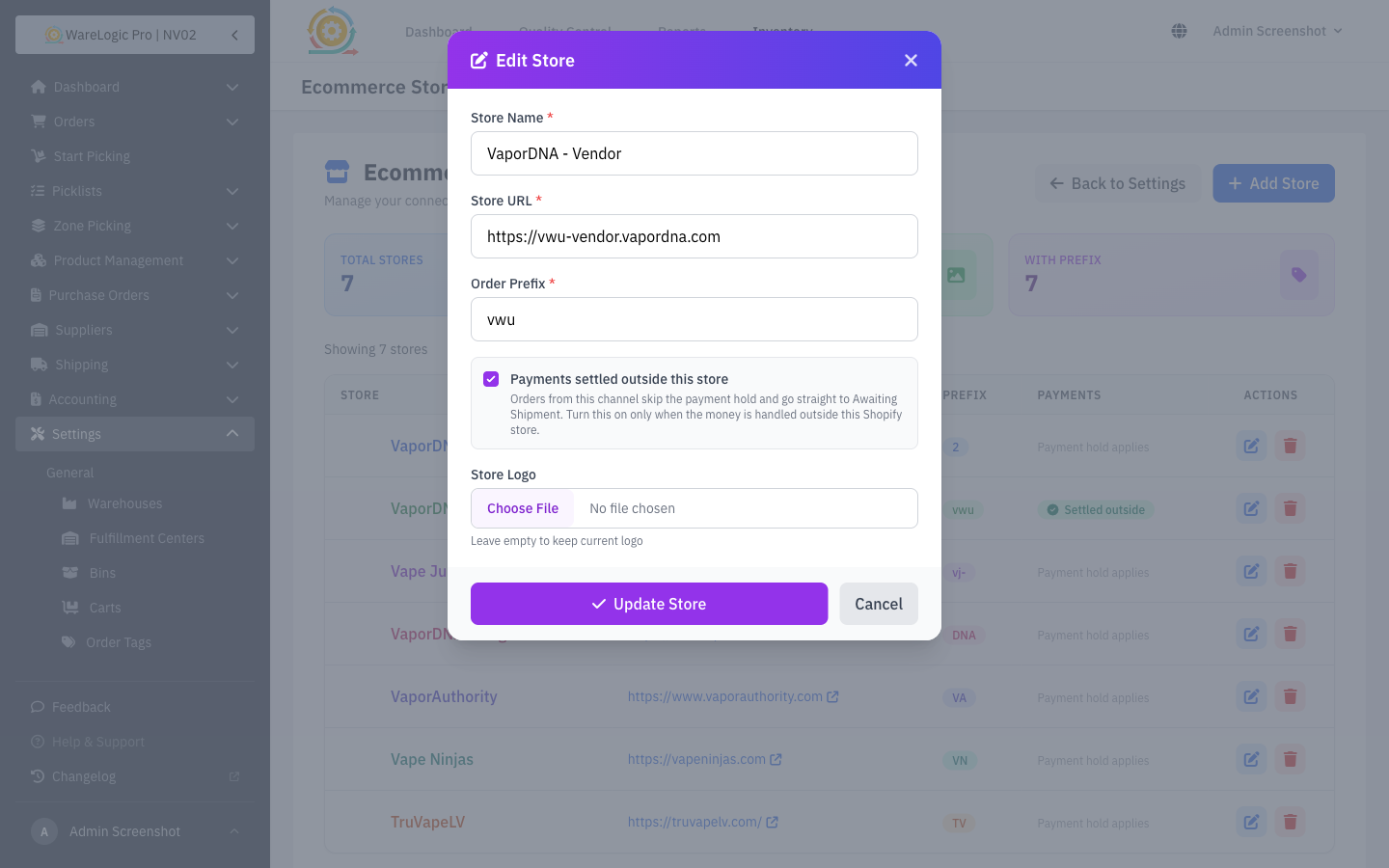
- A new setting on Settings → Ecommerce Stores tells the WMS when a channel's payments are settled outside Shopify, so its orders stop waiting in Awaiting Payment.
- It's turned on for the VaporDNA Vendor channel, and the orders stuck there are released automatically. Every other channel keeps its payment hold unless a manager turns this on.
- Refunds and cancellations still work as before on every channel.
Reports & Dashboard
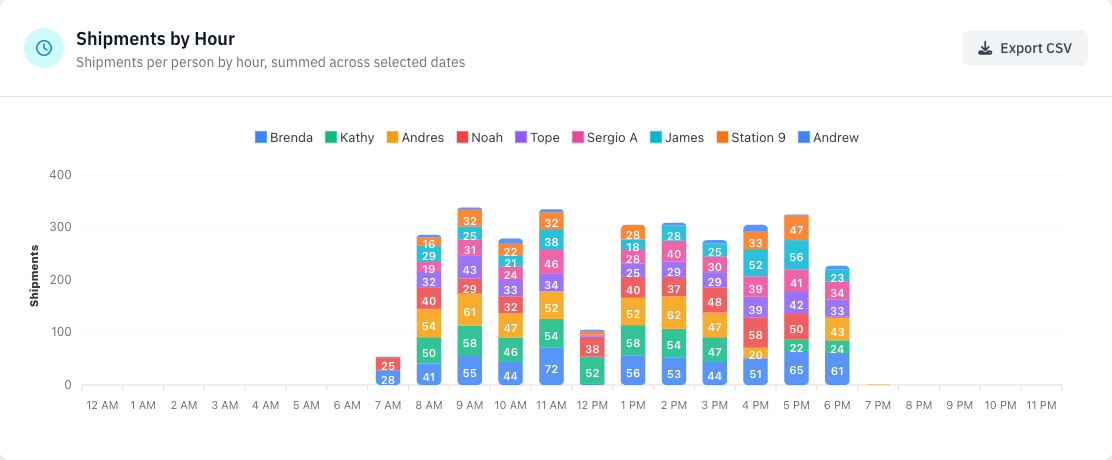
- The hourly shipments chart can now be broken down by shipper, and exported to CSV.
- The dashboard now opens on Today, matching the highlighted button, and loads faster.
- The "vs. last period" comparison is correct on every date. On some month-end dates it used to compare a period against part of itself.
Tighter Access Control
- Every page now checks the right permission, even when someone opens it from a saved link or by typing the address. Before, some pages were only hidden from the menu.
- Removing a permission from a user now truly locks them out of that page.
- After signing in, managers land on Orders and shippers on Quality Control.
- The old scan-and-ship dashboard has been retired. Old bookmarks to it take you to the Orders page.
Fixed
- Shopify orders shipped to a company-only address, with no first or last name, are no longer lost on the way into the WMS.
- Saving a product from the handheld no longer overwrites bin quantities that changed while the form was open.
- Time-on-floor figures are no longer inflated by a screen left open in the background.
- Generated packing slips no longer show the order source.
- Reprinting packing slips from the picklist wizard now asks for confirmation first.
- Item chips in the picklist wizard are back to their compact style.
- The hourly shipments chart tooltip no longer clashes with other charts.
For Admins
php artisan shopify:import-orders {store} {order numbers}brings in Shopify orders that never reached the WMS, by order number. Add--dry-runto check them first without saving anything.php artisan presence:repair-long-intervalsrebuilds time-on-floor records that were inflated before this release. It only reports what it would change until you add--apply.